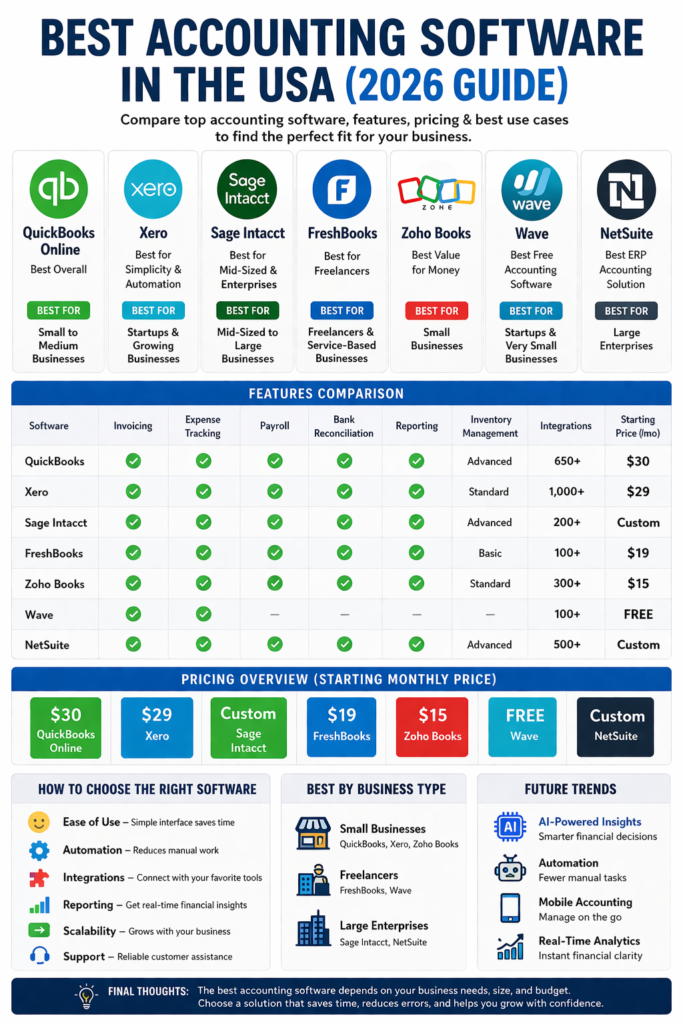
In today’s fast-paced digital economy, managing finances efficiently is no longer optional—it’s essential. Whether you are a startup founder, freelancer, or running a growing enterprise, choosing the right accounting software can make or break your financial success. The United States offers a wide range of accounting tools tailored for different business sizes and industries, each with unique features, pricing, and capabilities.
This comprehensive guide explores the best accounting software in the USA, their features, benefits, pricing, and how to choose the perfect one for your needs.
Why Accounting Software Is Important
Accounting software simplifies complex financial tasks such as:
- Tracking income and expenses
- Generating financial reports
- Managing payroll and taxes
- Automating invoicing
- Ensuring compliance with regulations
Modern cloud-based solutions also provide real-time insights, helping businesses make informed decisions quickly.
Top Accounting Software in the USA
1. QuickBooks Online – Best Overall
QuickBooks Online is widely considered the gold standard in the United States. It is used by millions of businesses due to its powerful features and flexibility.
Key Features:
- Expense tracking and invoicing
- Built-in payroll system
- Tax preparation tools
- Inventory management
- Advanced reporting
QuickBooks is especially strong in U.S.-specific features like tax compliance and payroll processing. It also integrates with hundreds of third-party apps, making it highly versatile.
Pros:
- Industry-leading features
- Excellent reporting tools
- Strong integration ecosystem
Cons:
- Higher pricing compared to competitors
- Slight learning curve
Best For:
Small to medium-sized businesses that need a complete accounting solution.
2. Xero – Best for Simplicity & Automation
Xero is a strong competitor to QuickBooks and is known for its clean interface and automation capabilities.
Key Features:
- Unlimited users on all plans
- Real-time bank reconciliation
- Multi-currency support
- Automated workflows
- 1000+ integrations
Xero stands out for its ease of use and collaboration features, allowing teams to work together without additional costs.
Pros:
- User-friendly interface
- Affordable pricing
- Excellent automation
Cons:
- Limited payroll features in the U.S.
- Less advanced reporting than QuickBooks
Best For:
Freelancers, startups, and international businesses.
3. Sage Intacct – Best for Mid-Sized & Enterprise Businesses
Sage Intacct is a powerful financial management platform designed for larger organizations.
Key Features:
- Multi-entity management
- Advanced financial reporting
- Budgeting and forecasting
- Compliance tools
Sage is particularly useful for industries like manufacturing, construction, and distribution where advanced inventory and job costing are required.
Pros:
- Highly scalable
- Strong compliance features
- Advanced analytics
Cons:
- Expensive
- Requires training
Best For:
Mid-sized to large businesses with complex financial needs.
4. FreshBooks – Best for Freelancers
FreshBooks is designed specifically for small service-based businesses.
Key Features:
- Easy invoicing
- Time tracking
- Expense management
- Client management tools
FreshBooks is simple and intuitive, making it ideal for non-accountants.
Pros:
- Easy to use
- Affordable
- Great customer support
Cons:
- Limited advanced features
- Not ideal for large businesses
Best For:
Freelancers and small service providers.
5. Zoho Books – Best Value for Money
Zoho Books is part of the Zoho ecosystem and offers powerful features at a competitive price.
Key Features:
- Automated workflows
- Inventory management
- GST/VAT compliance
- Integration with Zoho apps
Pros:
- Affordable pricing
- Strong automation
- Mobile-friendly
Cons:
- Limited third-party integrations compared to QuickBooks
Best For:
Small businesses looking for a budget-friendly solution.
6. Wave – Best Free Accounting Software
Wave Accounting is a popular free option for small businesses.
Key Features:
- Free invoicing and accounting
- Expense tracking
- Basic reporting
Wave offers essential features at no cost, making it ideal for startups on a tight budget.
Pros:
- Completely free
- Easy to use
- Good for basic needs
Cons:
- Limited features
- Paid add-ons for payroll
Best For:
Startups and very small businesses.
7. NetSuite – Best ERP Accounting Solution
Oracle NetSuite is a comprehensive enterprise resource planning (ERP) system.
Key Features:
- Financial management
- CRM integration
- Inventory and supply chain management
- Real-time analytics
Pros:
- All-in-one solution
- Highly scalable
- Advanced reporting
Cons:
- Expensive
- Complex implementation
Best For:
Large enterprises and fast-growing companies.
Key Features to Look for in Accounting Software
When choosing accounting software in the USA, consider the following features:
1. Ease of Use
A user-friendly interface is crucial, especially for non-accountants.
2. Automation
Automation reduces manual work and minimizes errors.
3. Integration
Look for software that integrates with tools like PayPal, Stripe, and CRM systems.
4. Reporting
Advanced reporting helps in making better financial decisions.
5. Scalability
Choose software that grows with your business.
Pricing Comparison (2026)
Here’s a general pricing overview:
- QuickBooks: $30–$200/month
- Xero: $29–$95/month
- FreshBooks: $19–$55/month
- Zoho Books: Affordable tiers
- Wave: Free
Pricing varies based on features, users, and add-ons like payroll.
QuickBooks vs Xero – Which Is Better?
This is one of the most common comparisons.
Choose QuickBooks if:
- You need advanced reporting
- You want built-in payroll
- Your business is U.S.-based
Choose Xero if:
- You want simplicity
- You need unlimited users
- You operate internationally
Both platforms offer similar core features like invoicing, expense tracking, and integrations.
Best Accounting Software by Business Type
For Small Businesses:
- QuickBooks
- Xero
- Zoho Books
For Freelancers:
- FreshBooks
- Wave
For Large Enterprises:
- Sage Intacct
- NetSuite
Benefits of Cloud Accounting Software
Modern accounting software is cloud-based, offering:
- Access from anywhere
- Real-time data updates
- Automatic backups
- Improved collaboration
Cloud solutions are now the standard in the U.S. accounting industry.
Common Mistakes to Avoid
- Choosing based on price only
- Ignoring scalability
- Not checking integrations
- Overlooking customer support
Selecting the wrong software can lead to inefficiencies and costly migrations later.
Future Trends in Accounting Software
The future of accounting software in the USA is driven by:
1. Artificial Intelligence
AI helps automate bookkeeping and generate insights.
2. Automation
Recurring tasks like invoicing and reconciliation are becoming fully automated.
3. Mobile Accounting
Apps allow business owners to manage finances on the go.
4. Real-Time Analytics
Instant financial insights improve decision-making.
Final Thoughts
Choosing the best accounting software in the USA depends on your business size, budget, and specific needs.
- If you want power and reliability, go with QuickBooks
- If you prefer simplicity and affordability, choose Xero
- If you run a large enterprise, consider Sage Intacct or NetSuite
- If you’re a freelancer, FreshBooks or Wave is ideal
The right accounting software not only saves time but also empowers your business with accurate financial insights and better decision-making.