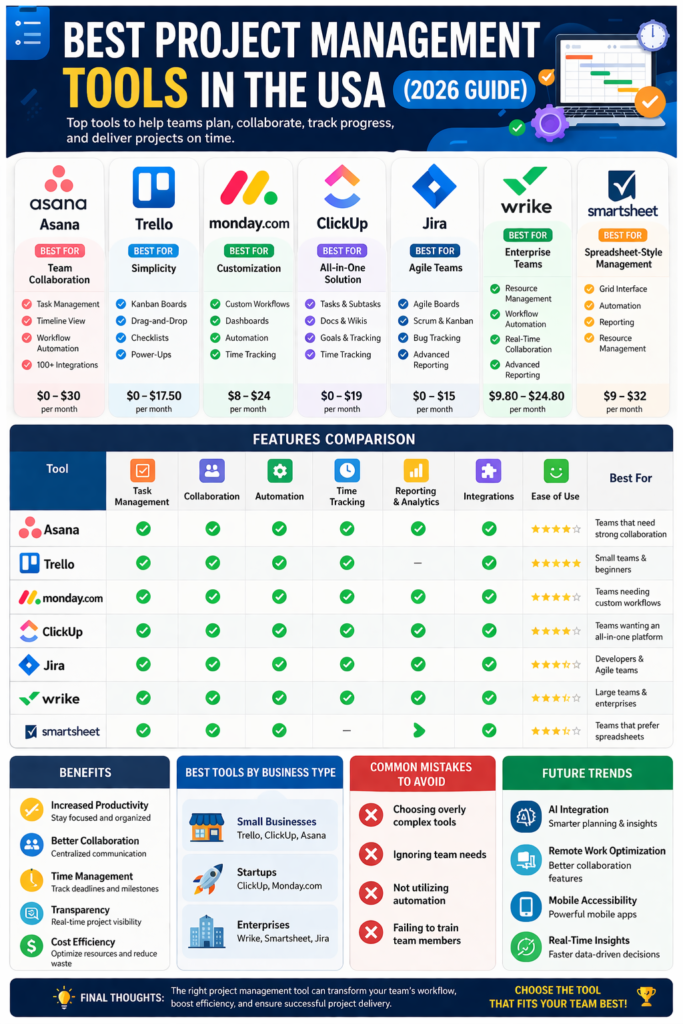
In today’s competitive and fast-evolving business landscape, managing projects efficiently is critical for success. Whether you’re leading a startup, managing a remote team, or overseeing enterprise-level operations, project management tools have become essential for staying organized, improving collaboration, and delivering results on time.
The United States is home to some of the most advanced and innovative project management software solutions in the world. These tools are designed to streamline workflows, enhance productivity, and ensure seamless communication across teams.
In this comprehensive guide, we explore the best project management tools in the USA, their features, benefits, pricing, and how to choose the right one for your needs.
Why Project Management Tools Are Important
Project management tools help businesses:
- Plan and organize tasks
- Track progress in real time
- Collaborate with team members
- Manage deadlines effectively
- Allocate resources efficiently
Without proper tools, projects can quickly become chaotic, leading to missed deadlines, budget overruns, and poor communication.
Top Project Management Tools in the USA
1. Asana– Best for Team Collaboration
Asana is one of the most popular project management tools in the USA, known for its clean interface and powerful collaboration features.
Key Features:
- Task assignments and tracking
- Timeline and calendar views
- Workflow automation
- Integration with apps like Slack and Google Drive
Pros:
- User-friendly interface
- Strong collaboration tools
- Flexible project views
Cons:
- Limited features in the free plan
- Can become complex for large teams
Best For:
Teams that need strong collaboration and task management.
2. Trello– Best for Simplicity
Trello uses a Kanban-style board system, making it easy to visualize tasks.
Key Features:
- Drag-and-drop boards
- Customizable workflows
- Power-ups (integrations)
- Checklists and deadlines
Pros:
- Extremely easy to use
- Great for beginners
- Free plan available
Cons:
- Limited advanced features
- Not ideal for complex projects
Best For:
Small teams and individuals.
3. Monday.com– Best for Customization
Monday.com is a highly customizable work management platform.
Key Features:
- Custom dashboards
- Automation tools
- Time tracking
- Visual project tracking
Pros:
- Highly flexible
- Great visual interface
- Strong reporting tools
Cons:
- Pricing can be high
- Learning curve for beginners
Best For:
Businesses that need customizable workflows.
4. Clickup– Best All-in-One Tool
ClickUp is rapidly growing in popularity due to its all-in-one capabilities.
Key Features:
- Task management
- Docs and collaboration
- Time tracking
- Goal setting
Pros:
- Feature-rich
- Affordable pricing
- Suitable for all team sizes
Cons:
- Interface can feel overwhelming
- Requires setup time
Best For:
Teams looking for a complete productivity solution.
5. Jira – Best for Agile Teams
Jira, developed by Atlassian, is widely used in software development.
Key Features:
- Agile project management
- Bug tracking
- Scrum and Kanban boards
- Advanced reporting
Pros:
- Ideal for developers
- Powerful tracking tools
- Highly customizable
Cons:
- Complex for non-technical users
- Requires training
Best For:
Software development and IT teams.
6. Wrike– Best for Enterprise Teams
Wrike is a powerful tool designed for larger teams and enterprises.
Key Features:
- Advanced reporting
- Resource management
- Workflow automation
- Real-time collaboration
Pros:
- Scalable
- Strong analytics
- Enterprise-level features
Cons:
- Expensive
- Steeper learning curve
Best For:
Large organizations with complex projects.
7. Smartsheet– Best Spreadsheet-Style Management
Smartsheet combines project management with spreadsheet functionality.
Key Features:
- Grid-based interface
- Automation workflows
- Reporting tools
- Resource management
Pros:
- Familiar interface
- Strong automation
- Great for data-heavy projects
Cons:
- Not very visual
- Can be complex
Best For:
Teams that prefer spreadsheet-style tools.
Key Features to Look for in Project Management Tools
When choosing a project management tool in the USA, consider these features:
1. Ease of Use
The tool should be intuitive and easy to navigate.
2. Collaboration
Look for features like file sharing, comments, and real-time updates.
3. Automation
Automation reduces repetitive tasks and saves time.
4. Integration
Ensure compatibility with tools like Slack, Zoom, and Google Workspace.
5. Reporting & Analytics
Detailed insights help track performance and improve decision-making.
Pricing Overview (2026)
Here’s a general pricing breakdown:
- Asana: Free to $30/month
- Trello: Free to $17.50/month
- Monday.com: $8–$24/month
- ClickUp: Free to $19/month
- Jira: Free to $15/month
- Wrike: $9.80–$24.80/month
- Smartsheet: $9–$32/month
Prices vary based on features, users, and business size.
Best Tools by Business Type
For Small Businesses:
- Trello
- ClickUp
- Asana
For Startups:
- ClickUp
- Monday.com
For Enterprises:
- Wrike
- Smartsheet
- Jira
Benefits of Using Project Management Tools
1. Improved Productivity
Teams can focus on tasks instead of managing chaos.
2. Better Communication
Centralized communication reduces misunderstandings.
3. Time Management
Deadlines are tracked and managed effectively.
4. Transparency
Everyone knows the project status at any time.
5. Cost Efficiency
Reduces delays and improves resource utilization.
Common Mistakes to Avoid
- Choosing overly complex tools
- Ignoring team needs
- Not utilizing automation
- Failing to train team members
Future Trends in Project Management Tools
1. AI Integration
Artificial Intelligence will automate planning and forecasting.
2. Remote Work Optimization
Tools will focus more on remote collaboration.
3. Mobile Accessibility
Apps will become more powerful on mobile devices.
4. Real-Time Insights
Instant analytics will drive faster decisions.
Final Thoughts
The best project management tool in the USA depends on your business goals, team size, and workflow requirements.
- Choose Asana for collaboration
- Go with trello for simplicity
- Use clickup for all-in-one features
- Pick jira for development teams
Investing in the right project management tool can transform your workflow, improve team efficiency, and ensure project success.