Introduction: Why Project Management Software Is No Longer Optional
In today’s fast-paced digital world, managing projects with spreadsheets, emails, and sticky notes is no longer enough. Businesses, freelancers, startups, and remote teams are turning to project management software to streamline workflows, improve collaboration, and deliver projects on time.
Whether you are running a small business, managing a remote team, or handling multiple clients, project management tools help you stay organized, reduce errors, and increase productivity. As competition grows and deadlines become tighter, the right project management software can be the difference between success and failure.
This in-depth guide explains what project management software is, how it works, its benefits, features, types, pricing models, and how to choose the best tool for your needs.
What Is Project Management Software?
Project management software is a digital tool designed to plan, organize, track, and manage projects from start to finish. It allows teams and individuals to create tasks, assign responsibilities, set deadlines, monitor progress, and collaborate in real time.
Instead of relying on manual processes, project management platforms provide a centralized system where everything related to a project is stored—tasks, files, discussions, timelines, and reports.
How Project Management Software Works
Most project management tools follow a similar structure:
- Project Creation – Set up a project with goals, timelines, and milestones
- Task Management – Break the project into tasks and subtasks
- Team Collaboration – Assign tasks, comment, share files, and communicate
- Progress Tracking – Monitor deadlines, status updates, and completion rates
- Reporting & Analytics – Generate insights on performance, time, and resources
This structured approach reduces confusion and ensures everyone knows what needs to be done and by when.
Key Benefits of Using Project Management Software
1. Improved Productivity
Project management tools eliminate guesswork. Clear task assignments and deadlines help teams work faster and more efficiently.
2. Better Team Collaboration
With built-in chat, comments, and file sharing, teams can collaborate without switching between multiple apps.
3. Real-Time Project Tracking
Managers can see progress instantly, identify bottlenecks, and take action before problems escalate.
4. Time and Cost Savings
Automation reduces manual work, minimizes errors, and helps control budgets.
5. Transparency and Accountability
Every task has an owner, deadline, and status—making accountability clear.
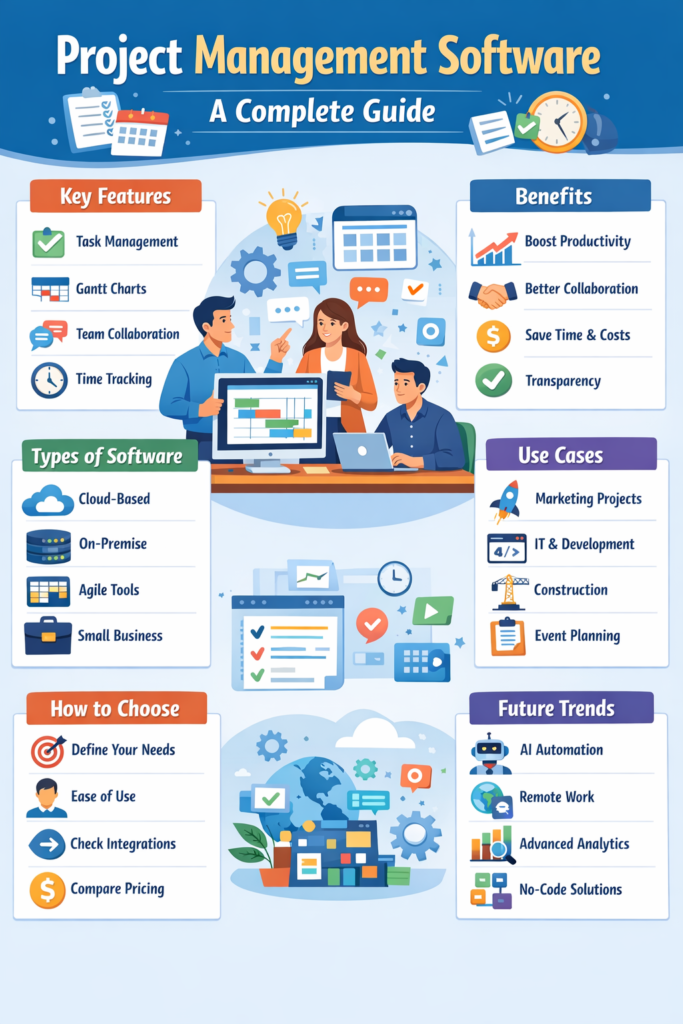
Essential Features of Project Management Software
When evaluating project management tools, look for these core features:
Task and Workflow Management
Create tasks, subtasks, dependencies, and custom workflows.
Gantt Charts and Timelines
Visualize project schedules and track progress over time.
Team Collaboration Tools
Comments, mentions, notifications, and file sharing.
Time Tracking
Track hours spent on tasks for billing and productivity analysis.
Reporting and Analytics
Generate reports on performance, workload, and deadlines.
Integrations
Connect with tools like Slack, Google Drive, Zoom, CRM systems, and accounting software.
Types of Project Management Software
1. Cloud-Based Project Management Software
Hosted online and accessible from anywhere. Ideal for remote teams and growing businesses.
2. On-Premise Project Management Software
Installed on company servers. Preferred by organizations with strict data control requirements.
3. Agile Project Management Tools
Designed for Scrum and Kanban methodologies. Popular in software development teams.
4. Enterprise Project Management Software
Built for large organizations managing complex, multi-department projects.
5. Freelance and Small Business Tools
Lightweight and affordable tools for individuals and small teams.
Project Management Software for Different Users
For Small Businesses
Small businesses benefit from simple, affordable tools that handle task tracking, deadlines, and team collaboration without complexity.
For Enterprises
Large companies require advanced reporting, resource management, and security features.
For Freelancers
Freelancers use project management software to manage clients, deadlines, invoices, and time tracking.
For Remote Teams
Cloud-based platforms enable seamless collaboration across different time zones.
Popular Use Cases of Project Management Software
- Marketing campaign planning
- Software development and IT projects
- Construction and engineering projects
- Content creation and editorial calendars
- Client onboarding and service delivery
- Event planning and coordination
Project Management Methodologies Supported by Software
Waterfall
Sequential project stages with fixed timelines.
Agile
Flexible, iterative approach with continuous feedback.
Scrum
Short sprints and regular reviews.
Kanban
Visual workflow management using boards and cards.
Most modern project management tools support multiple methodologies, allowing teams to customize workflows.
Pricing Models of Project Management Software
Free Plans
Basic features for individuals or small teams.
Subscription-Based Pricing
Monthly or annual plans based on users or features.
Per-User Pricing
Cost increases with team size.
Enterprise Pricing
Custom pricing for large organizations with advanced needs.
Understanding pricing helps you choose a solution that fits your budget without sacrificing essential features.
How to Choose the Best Project Management Software
1. Define Your Needs
Identify your project size, team structure, and workflow requirements.
2. Consider Ease of Use
A complex tool can reduce productivity instead of improving it.
3. Check Scalability
Choose software that can grow with your business.
4. Review Integrations
Ensure it works with your existing tools.
5. Compare Pricing and Value
The cheapest option is not always the best—focus on ROI.
Common Mistakes to Avoid When Using Project Management Software
- Choosing overly complex software
- Not training team members properly
- Ignoring reporting and analytics
- Overloading projects with unnecessary tasks
- Failing to update progress regularly
Avoiding these mistakes ensures maximum value from your tool.
Project Management Software Trends in 2025
AI-Powered Automation
AI helps predict deadlines, assign tasks, and optimize workflows.
Remote-First Features
Tools are increasingly designed for distributed teams.
Advanced Analytics
Better insights into productivity and performance.
No-Code Customization
Users can customize workflows without technical skills.
Is Project Management Software Worth It?
Absolutely. Whether you manage one project or hundreds, project management software saves time, reduces stress, and improves outcomes. Businesses that use structured project management tools consistently outperform those that rely on manual systems.
Final Thoughts
Project management software has become an essential tool for modern businesses, freelancers, and teams. It simplifies complex workflows, enhances collaboration, and ensures projects are completed efficiently.
Choosing the right project management software depends on your goals, budget, and team structure—but once implemented correctly, it can transform the way you work.
If you want better organization, improved productivity, and successful project delivery, investing in project management software is a smart and future-proof decision.